API Reference for Django Ninja
The easiest way to render a modern and beautiful API reference based on your Django Ninja OpenAPI document.
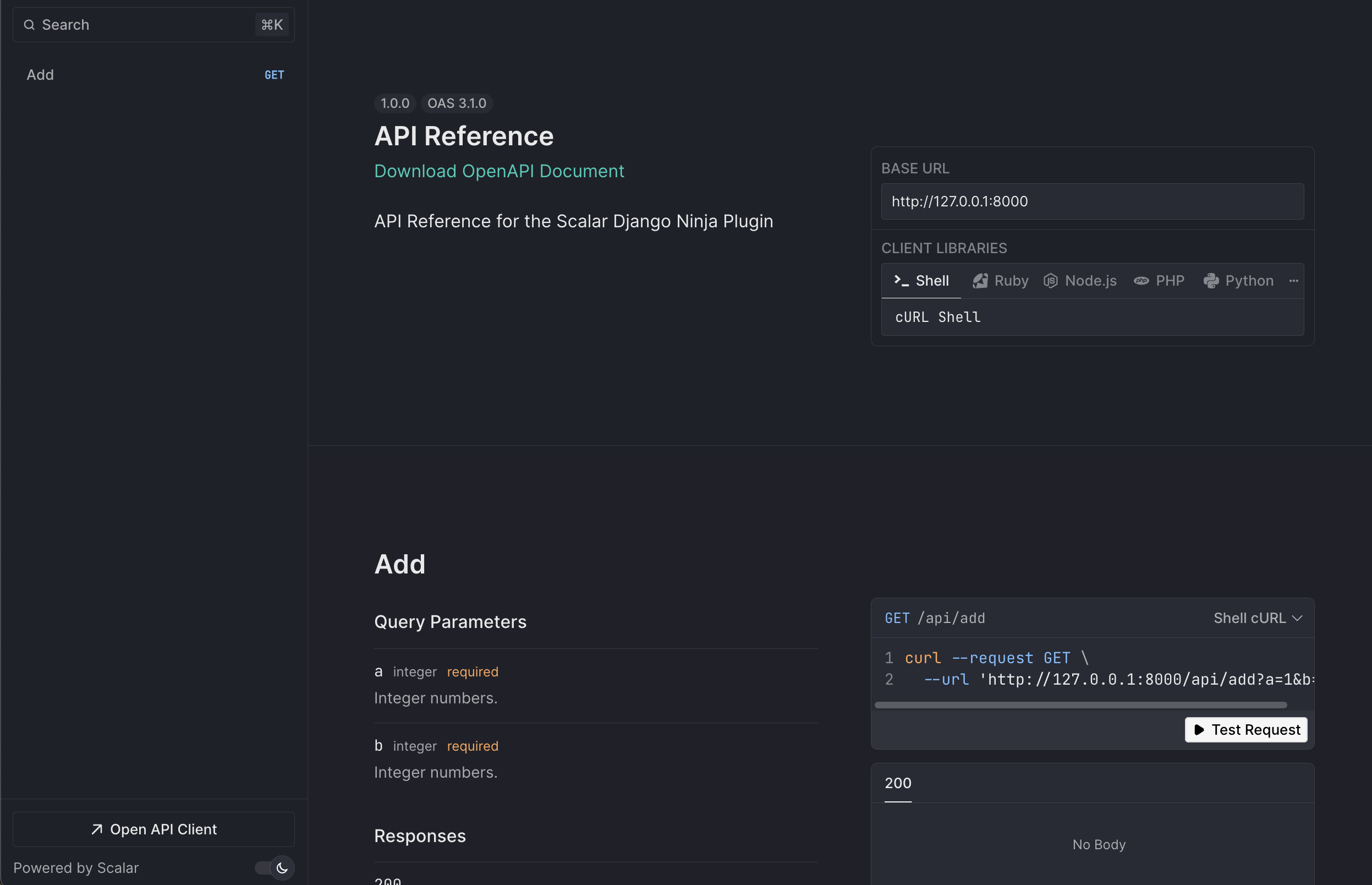
Installation
pip install scalar-ninja
Usage
Integrating Scalar with Django Ninja is simple.
Basic Usage
Just pass the ScalarViewer instance to the docs parameter of the NinjaAPI instance.
from ninja import NinjaAPI
from scalar_ninja import ScalarViewer

api = NinjaAPI(
    version="1.0.0",
    title="API Reference",
    description="API Reference for the Scalar Django Ninja Plugin",
    docs=ScalarViewer(),
)

@api.get("/add")
def add(request, a: int, b: int):
    return {"result": a + b}


urlpatterns = [
    path("admin/", admin.site.urls),
    path("api/", api.urls),
]
This renders a beautiful API reference at /api/docs based on your API.
Advanced Usage
You can configure ScalarViewer by passing ScalarConfig to the method. Detailed configuration options are listed here.
from ninja import NinjaAPI
from scalar_ninja import ScalarConfig, ScalarViewer

scalar_config = ScalarConfig(
    show_sidebar=False,
    force_dark_mode_state="dark",
)

api = NinjaAPI(
    version="1.0.0",
    title="API Reference",
    description="API Reference for the Scalar Django Ninja Plugin",
    docs=ScalarViewer(scalar_config),
)
For backwards compatibility you can also add the available configuration options as kwargs to ScalarViewer:
from ninja import NinjaAPI
from scalar_ninja import ScalarViewer

api = NinjaAPI(
    version="1.0.0",
    title="API Reference",
    description="API Reference for the Scalar Django Ninja Plugin",
    docs=ScalarViewer(show_sidebar=False, force_dark_mode_state="dark"),
    docs_url="/docs/",
)
It's recommended to use ScalarConfig to have a fully typed configuration.
Configuration
Currently available configuration options are listed below.
Core Configuration
openapi_url(defaultNone) - The OpenAPI URL that Scalar should load and use. This is normally done automatically by Django Ninja using the default URL/api/openapi.json. Ifcontentorsourcesare provided, this parameter is ignored.content(defaultNone) - Directly pass an OpenAPI/Swagger document as a string (JSON or YAML) or as a dictionary. Ifsourcesare provided, this parameter is ignored.sources(defaultNone) - Add multiple OpenAPI documents to render all of them. Each source can have a title, slug, url, content, and default flag.title(default"Scalar") - The title of the API reference page
OpenAPISource Configuration
When using multiple sources, each OpenAPISource can be configured with:
title(defaultNone) - Display name for the API. If not provided, will fallback to 'API #1', 'API #2', etc.slug(defaultNone) - URL identifier for the API. If not provided, will be auto-generated from the title or index.url(defaultNone) - URL to the OpenAPI document (JSON or YAML). Mutually exclusive with content.content(defaultNone) - Direct OpenAPI content as string (JSON/YAML) or dictionary. Mutually exclusive with url.default(defaultFalse) - Whether this source should be the default when multiple sources are provided.agent(defaultNone) - Agent configuration for this source. Object with optionalkey(string) for production and optionaldisabled(boolean) to turn off for this source.
Display Options
layout(defaultLayout.MODERN) - Options: Layoutshow_sidebar(defaultTrue)hide_models(defaultFalse)hide_search(defaultFalse) - Whether to show the sidebar search barhide_test_request_button(defaultFalse) - Whether to show the "Test Request" buttonhide_download_button(defaultFalse) - Deprecated: Usedocument_download_typeinsteaddocument_download_type(defaultDocumentDownloadType.BOTH) - Sets the file type of the document to download. Options: DocumentDownloadType
Theme and Appearance
dark_mode(defaultTrue)force_dark_mode_state(defaultNone) - Force dark mode state to always be this state. Can be 'dark' or 'light'hide_dark_mode_toggle(defaultFalse) - Whether to show the dark mode togglewith_default_fonts(defaultTrue) - Whether to use default fonts (Inter and JetBrains Mono)custom_css(default"") - Custom CSS string to apply to the API reference
Search and Navigation
search_hot_key(defaultSearchHotKey.K) - Options: SearchHotKeydefault_open_all_tags(defaultFalse)expand_all_model_sections(defaultFalse) - Whether to expand all model sections by defaultexpand_all_responses(defaultFalse) - Whether to expand all response sections by defaultorder_required_properties_first(defaultTrue) - Whether to order required properties first in schema objects
Server Configuration
base_server_url(default"") - If you want to prefix all relative servers with a base URLservers(default[]) - List of OpenAPI Server Objects. Each item must have a requiredurl(string) and may have optionaldescription(string) andvariables(map). Example:[{"url": "https://api.example.com", "description": "Production"}]hidden_clients(default[])
Authentication
authentication(default{})hide_client_button(defaultFalse) - Whether to show the client button from the reference sidebar and modalpersist_auth(defaultFalse) - Whether to persist authentication credentials in local storage
Advanced
scalar_js_url(default"https://cdn.jsdelivr.net/npm/@scalar/api-reference")scalar_proxy_url(defaultNone)scalar_favicon_url(default"https://django-ninja.dev/img/favicon.png")integration(defaultNone)theme(defaultTheme.DEFAULT) - Options: Themeagent(defaultNone) - Agent configuration (e.g.AgentConfig(disabled=True)to disable globally). Same shape as per-source agent: optionalkey, optionaldisabled.
Agent
Agent adds an AI chat interface to your API reference. Users can ask questions about your API and get contextual answers based on your OpenAPI document.
- Enabled by default on
http://localhostfor testing (10 free messages) - Does not appear in production unless a key is provided
- Requires an Agent key for production deployments
- Your OpenAPI document is uploaded on first message
To enable Agent in production, pass your key. With a single document (no sources):
from scalar_ninja import AgentConfig, ScalarConfig, ScalarViewer

api = NinjaAPI(
    docs=ScalarViewer(ScalarConfig(
        openapi_url="/api/openapi.json",
        agent=AgentConfig(key="put-your-agent-scalar-key-here"),
    )),
)
With multiple sources, set the key per source:
from scalar_ninja import AgentConfig, OpenAPISource, ScalarConfig, ScalarViewer

api = NinjaAPI(
    docs=ScalarViewer(ScalarConfig(
        sources=[
            OpenAPISource(
                url="https://example.com/openapi.json",
                agent=AgentConfig(key="put-your-agent-scalar-key-here"),
            ),
        ],
    )),
)
To disable Agent entirely:
from scalar_ninja import AgentConfig, ScalarConfig, ScalarViewer

api = NinjaAPI(
    docs=ScalarViewer(ScalarConfig(agent=AgentConfig(disabled=True))),
)
DocumentDownloadType
from scalar_ninja import DocumentDownloadType

# Available options:
DocumentDownloadType.JSON    # Download as JSON only
DocumentDownloadType.YAML    # Download as YAML only
DocumentDownloadType.BOTH    # Download as both JSON and YAML
DocumentDownloadType.NONE    # Hide download button
Layout
from scalar_ninja import Layout

# Available options:
Layout.MODERN    # Modern layout
Layout.CLASSIC   # Classic layout
SearchHotKey
from scalar_ninja import SearchHotKey

# All letters from A to Z, e.g.:
SearchHotKey.K   # Use 'K' key for 'Cmd+K' (Mac) / 'Ctrl+K' (Windows/Linux)
Theme
from scalar_ninja import Theme

# Available options:
Theme.DEFAULT   # Default theme
Theme.NONE      # No theme



