FastAPI API documentation
Swap FastAPI's built-in docs pages for an interactive Scalar API reference with one pip install and one function call.
FastAPI already does the hard part. It builds an OpenAPI document from your path operations, Pydantic models and type hints, and serves it at /openapi.json. Out of the box it renders that document twice: Swagger UI at /docs and ReDoc at /redoc. The scalar-fastapi package reads the same document and gives you a reference with a built-in request client, search, themes and code samples, without touching your routes.
Set up Scalar in FastAPI
Install scalar-fastapi
pip install scalar-fastapi
Add the reference to your app
add_scalar_reference registers the route for you and reads the title and OpenAPI URL from your app:
from fastapi import FastAPI
from scalar_fastapi import add_scalar_reference

app = FastAPI()

add_scalar_reference(app)
It accepts route (default /scalar) and include_in_schema (default False). Every other keyword argument goes straight to get_scalar_api_reference, so you can set a theme in the same call:
from scalar_fastapi import add_scalar_reference, Theme

add_scalar_reference(app, route="/docs/scalar", theme=Theme.KEPLER)
Run the app and open /scalar
Start the server (for example fastapi dev main.py or uvicorn main:app --reload) and open http://127.0.0.1:8000/scalar.
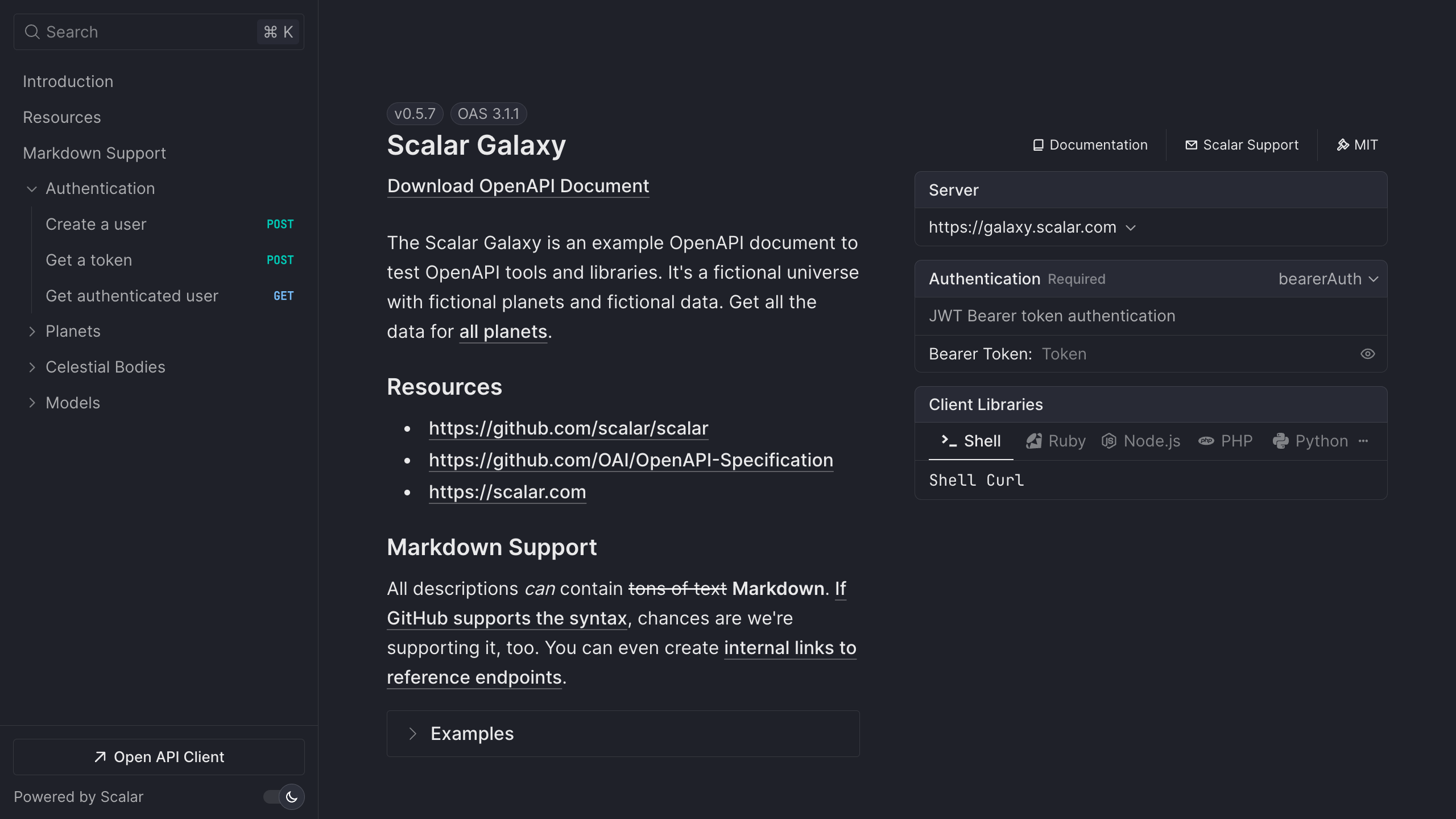
Try a live reference
The Scalar Galaxy example API below is rendered by the same API reference component that scalar-fastapi serves. Pick an operation and send a request from the built-in client.
Open the live demo in a new tab
Full control over the route
If you want to own the route yourself, for example to add dependencies or authentication, call get_scalar_api_reference from a normal path operation:
from fastapi import FastAPI
from scalar_fastapi import get_scalar_api_reference

app = FastAPI()

@app.get("/scalar", include_in_schema=False)
async def scalar_html():
    return get_scalar_api_reference(
        # Your OpenAPI document
        openapi_url=app.openapi_url,
        # Avoid CORS issues (optional)
        scalar_proxy_url="https://proxy.scalar.com",
    )
The same function can render several OpenAPI documents in one reference with OpenAPISource, which helps when you split a public and an admin API into separate FastAPI apps. The FastAPI integration guide lists every option, including layout, search hotkey, hidden models, servers and authentication defaults.
What you get
The package is free and MIT licensed. The OpenAPI document it reads is also the input for the rest of Scalar.
- An interactive API reference. Every path operation and Pydantic model, with search, eleven built-in themes, dark mode and request code samples in popular languages.
- A built-in API client. "Test Request" opens a full client with environments, auth and history, so you can drop the Swagger UI "Try it out" flow. It also runs as a desktop and web app.
- SDKs from the same document. Python, TypeScript, Go and CLI are generally available; Java, Kotlin, Ruby, C#, PHP, Rust, Swift, Dart and C++ are experimental.
- A hosted MCP server so AI agents can call the endpoints you choose, with OAuth. Scalar hosts it; there is nothing to deploy.
To use SDKs and MCP, export the document and publish it to the Scalar Registry. FastAPI can write it without starting a server:
python -c "import json; from main import app; print(json.dumps(app.openapi()))" > openapi.json
npx @scalar/cli registry publish --namespace your-namespace --slug your-api ./openapi.json
Run those two lines in CI and your docs, SDKs and MCP server follow every merge. Free hosted docs cover up to 3 APIs; Pro is $150 per month. See pricing.
Migrating from Swagger UI and ReDoc
Nothing about your OpenAPI document changes. You are only changing which page renders it.
- Add Scalar with the steps above and check it at
/scalar. - When you are happy, turn off the default pages. FastAPI lets you disable either one by setting its URL to
None:
from fastapi import FastAPI
from scalar_fastapi import add_scalar_reference

app = FastAPI(docs_url=None, redoc_url=None)

add_scalar_reference(app, route="/docs")
- Mounting Scalar at
/docskeeps existing bookmarks and links working.
A few things to know. Scalar reads the same summary, description, tags and responses you already set on path operations, so there is nothing to annotate again. Tag groups and code samples can be added with OpenAPI extensions if you want more than FastAPI generates. If you configured Swagger UI OAuth settings through swagger_ui_init_oauth, set the equivalent defaults with the authentication argument instead. The Swagger UI migration guide has a feature-by-feature comparison.
Frequently asked questions
How do I add API documentation to FastAPI?
FastAPI generates an OpenAPI document automatically. To render it with Scalar, run pip install scalar-fastapi and call add_scalar_reference(app). The reference appears at /scalar.
Can I replace the /docs page in FastAPI?
Yes. Create the app with FastAPI(docs_url=None, redoc_url=None) to turn off Swagger UI and ReDoc, then call add_scalar_reference(app, route="/docs") so Scalar takes over the same path.
Is scalar-fastapi free?
Yes. The package and the API reference it renders are open source under the MIT license. Serving the reference from your own FastAPI app has no cost. Paid plans cover hosted docs with more APIs and seats, SDKs, and MCP usage.
Does it work with Pydantic v2 and OpenAPI 3.1?
Yes. Current FastAPI versions emit OpenAPI 3.1 documents, and Scalar renders OpenAPI 3.0 and 3.1, including JSON Schema features such as anyOf and nullable types that Pydantic v2 produces.
Can I show more than one FastAPI app in one reference?
Yes. Pass a list of OpenAPISource objects to get_scalar_api_reference(sources=[...]). Readers switch between documents from a selector in the reference.
Related
- Learn: What is OpenAPI? · OpenAPI 3.1 vs 3.0
- Docs: FastAPI integration guide
- Product: API References — the open-source reference behind
scalar-fastapi, also available hosted



