API Reference for Hono
This middleware provides an easy way to render a beautiful API reference based on an OpenAPI/Swagger document with Hono.
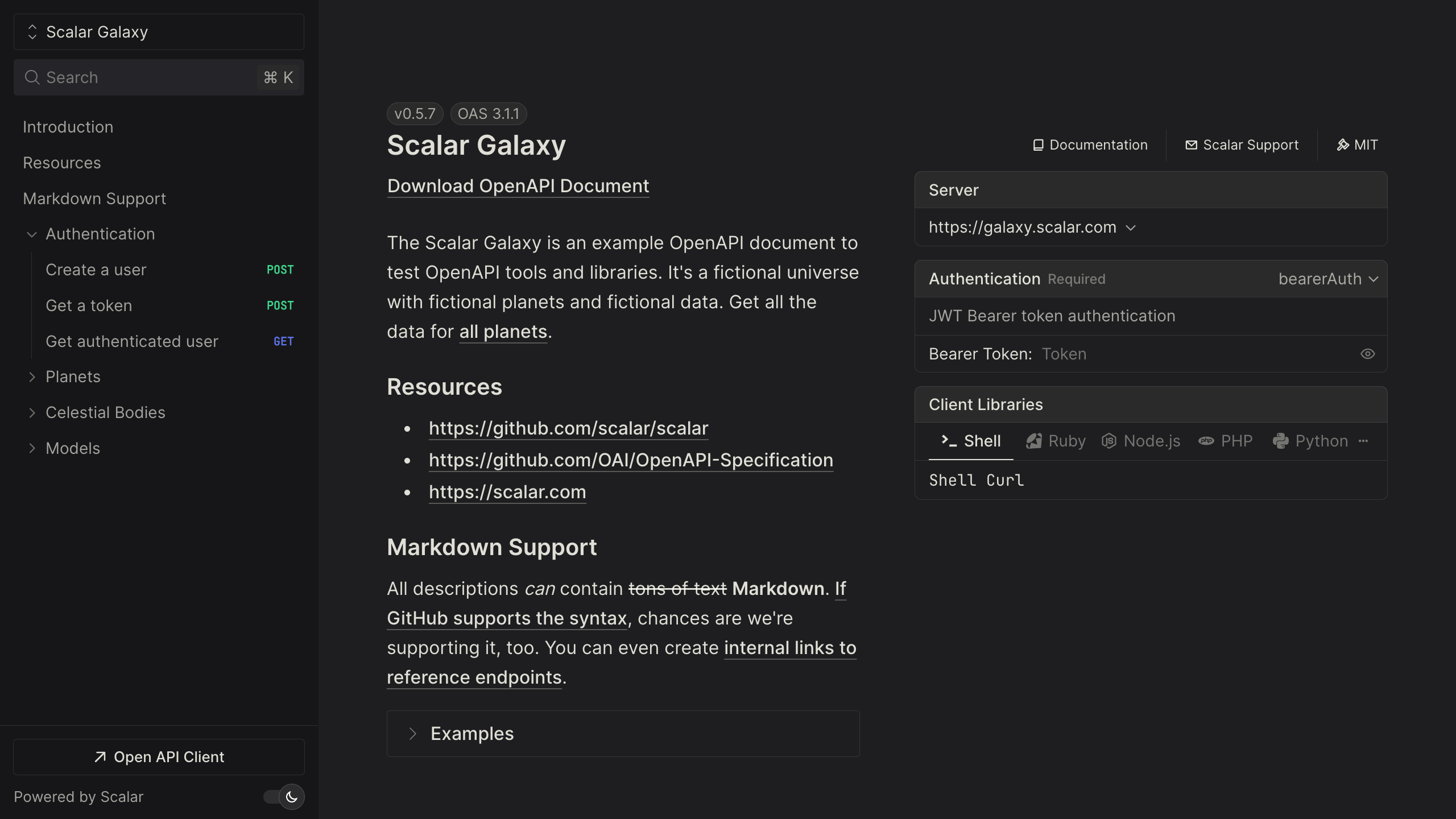
Installation
npm install @scalar/hono-api-reference
Usage
Set up Zod OpenAPI Hono or Hono OpenAPI and pass the configured URL to the Scalar middleware:
import { Hono } from 'hono'
import { Scalar } from '@scalar/hono-api-reference'

// Type your runtime bindings once (for example Cloudflare Workers env vars)
type Bindings = {
  ENVIRONMENT: string
}

const app = new Hono<{ Bindings: Bindings }>()

// Use the middleware to serve the API Reference at /scalar
app.get('/scalar', Scalar({ url: '/doc' }))

// Or resolve the configuration per request from the context. Pass the same
// bindings to `Scalar` so `c.env` is fully typed:
app.get(
  '/scalar',
  Scalar<{ Bindings: Bindings }>((c) => ({
    url: '/doc',
    proxyUrl: c.env.ENVIRONMENT === 'development' ? 'https://proxy.scalar.com' : undefined,
  })),
)

export default app
The Hono middleware takes our universal configuration object, read more about configuration in the core package README.
Serve the reference and document together
With the middleware above you serve the OpenAPI document on one route and point the reference at it on another. If you generate your document with Zod OpenAPI Hono, Scalar.serve does both from a single mount, so you do not have to add a separate document route and keep its url in sync:
import { OpenAPIHono } from '@hono/zod-openapi'
import { Scalar } from '@scalar/hono-api-reference'

const app = new OpenAPIHono()

// ... register your routes ...

// Renders the reference at /scalar and serves the document at /scalar/openapi.json
app.route(
  '/scalar',
  Scalar.serve({
    document: () =>
      app.getOpenAPI31Document({
        openapi: '3.1.0',
        info: { title: 'Example', version: 'v1' },
      }),
  }),
)

export default app
document can be the OpenAPI object itself or a function that returns it. The function receives the Hono Context, so you can read c.env or c.req and build the document per request. Pass any other configuration option (such as theme or pageTitle) alongside document, and change where the JSON is served with documentPath (defaults to /openapi.json).
Themes
The middleware ships with a custom Hono theme that is applied by default, so there is nothing to opt into and no hono theme token to set. To use a different look, set theme to one of the predefined themes — alternate, default, moon, purple, solarized, bluePlanet, deepSpace, saturn, kepler, mars, or laserwave — or set it to none to drop the default Hono theme and start from a blank slate. All themes come with a light and dark color scheme.
import { Scalar } from '@scalar/hono-api-reference'

// Switch the theme (or pass other options)
app.get('/scalar', Scalar({
  url: '/doc',
  theme: 'purple',
}))
Using hono-openapi
The example above uses Zod OpenAPI Hono. If you prefer hono-openapi, it generates the document as middleware, so you can add it to an existing app without rewriting your routes. Describe routes with describeRoute, serve the generated document with openAPIRouteHandler, and point Scalar at it:
import { Hono } from 'hono'
import { describeRoute, openAPIRouteHandler } from 'hono-openapi'
import { Scalar } from '@scalar/hono-api-reference'

const app = new Hono()

app.get(
  '/',
  describeRoute({
    summary: 'Say hello',
    responses: { 200: { description: 'OK' } },
  }),
  (c) => c.text('Hello!'),
)

// Serve the generated OpenAPI document
app.get(
  '/openapi.json',
  openAPIRouteHandler(app, {
    documentation: {
      info: { title: 'Example', version: '1.0.0' },
    },
  }),
)

// Render the reference from it
app.get('/scalar', Scalar({ url: '/openapi.json' }))

export default app
Runtimes
Hono runs on many runtimes, and the Scalar middleware works on all of them — it only renders HTML, so nothing here is Node-specific. Only the server entrypoint changes.
Cloudflare Workers, Bun, and Deno export the app directly:
app.get('/scalar', Scalar({ url: '/doc' }))

export default app
Deno can also serve it explicitly:
Deno.serve(app.fetch)
Node.js uses @hono/node-server:
import { serve } from '@hono/node-server'

serve({ fetch: app.fetch, port: 3000 })
Custom page title
There's one additional option to set the page title:
import { Scalar } from '@scalar/hono-api-reference'

// Set a page title
app.get('/scalar', Scalar({
  url: '/doc',
  pageTitle: 'Awesome API',
}))
Custom CDN
You can use a custom CDN, default is https://cdn.jsdelivr.net/npm/@scalar/api-reference.
You can also pin the CDN to a specific version by specifying it in the CDN string like https://cdn.jsdelivr.net/npm/@scalar/api-reference@1.25.28
You can find all available CDN versions here
import { Scalar } from '@scalar/hono-api-reference'

app.get('/scalar', Scalar({ url: '/doc', pageTitle: 'Awesome API' }))

app.get('/scalar', Scalar({
  url: '/doc',
  cdn: 'https://cdn.jsdelivr.net/npm/@scalar/api-reference@latest',
}))
Markdown for LLMs
If you want to create a Markdown version of the API reference (for LLMs), install @scalar/openapi-to-markdown:
npm install @scalar/openapi-to-markdown
And add an additional route for it:
import { Hono } from 'hono'
import { createMarkdownFromOpenApi } from '@scalar/openapi-to-markdown'

const app = new Hono()

// Generate Markdown from your OpenAPI document
const markdown = await createMarkdownFromOpenApi(content)

/**
 * Register a route to serve the Markdown for LLMs
 *
 * Q: Why /llms.txt?
 * A: It's a proposal to standardise on using an /llms.txt file.
 *
 * @see https://llmstxt.org/
 */
app.get('/llms.txt', (c) => c.text(markdown))

export default app
Or, if you are using Zod OpenAPI Hono:
// Get the OpenAPI document
const content = app.getOpenAPI31Document({
  openapi: '3.1.0',
  info: { title: 'Example', version: 'v1' },
})

const markdown = await createMarkdownFromOpenApi(JSON.stringify(content))

app.get('/llms.txt', async (c) => {
  return c.text(markdown)
})
Publish to the Scalar Registry
If you generate your OpenAPI document from Zod OpenAPI Hono, you can publish it to the Scalar Registry to power hosted docs, share it with your team, and keep versions in sync. You do not need a running server for this — OpenAPIHono can build the document straight from your Zod-driven routes.
Add a small script that calls getOpenAPI31Document() and writes the result to a file:
// scripts/generate-openapi.ts
import { writeFileSync } from 'node:fs'
import { app } from '../src/app'

const document = app.getOpenAPI31Document({
  openapi: '3.1.0',
  info: {
    title: 'Example API',
    version: '0.1.0',
  },
  servers: [{ url: process.env.BASE_URL ?? 'https://example.com' }],
})

writeFileSync('openapi.json', `${JSON.stringify(document, null, 2)}\n`)
Here app is your OpenAPIHono instance with all routes registered. This is the same document you would serve at runtime with app.doc31('/openapi.json', ...), just written to a file instead.
Wire it up with a couple of scripts. The Scalar CLI handles validation and publishing:
{
  "scripts": {
    "openapi:generate": "tsx scripts/generate-openapi.ts openapi.json",
    "scalar:publish": "pnpm openapi:generate && scalar registry publish openapi.json --namespace your-namespace --slug your-api"
  }
}
To keep the registry up to date automatically, run the same steps in CI whenever a route or schema changes:
# .github/workflows/scalar.yml
name: Publish API docs

on:
  push:
    branches: [main]
    # Only republish when something that can change the document changes
    paths:
      - 'src/**'
      - 'scripts/generate-openapi.ts'
  workflow_dispatch: {}

jobs:
  publish:
    runs-on: ubuntu-latest
    steps:
      - uses: actions/checkout@v4
      - uses: pnpm/action-setup@v4
      - uses: actions/setup-node@v4
        with:
          # @scalar/cli requires Node >= 24
          node-version: 24
          cache: pnpm

      - name: Install
        run: pnpm install --frozen-lockfile

      - name: Generate OpenAPI document
        run: pnpm openapi:generate

      - name: Validate document
        run: pnpm dlx @scalar/cli document validate openapi.json

      - name: Publish to Scalar Registry
        env:
          SCALAR_API_KEY: ${{ secrets.SCALAR_API_KEY }}
        run: |
          pnpm dlx @scalar/cli auth login --token "$SCALAR_API_KEY"
          # Publish under the document's own info.version so a docs route can
          # pin a stable version. --force overwrites that version on every push.
          VERSION="$(node -p "require('./openapi.json').info.version")"
          pnpm dlx @scalar/cli registry publish openapi.json \
            --namespace your-namespace --slug your-api \
            --version "$VERSION" --force



